Guardrails and approvals
Sometimes an agent should stop and ask a person before it acts, or when it isn't sure. Kampong Agents has two ways to pause a run for a human, and one way to trigger that pause automatically on low confidence.
Three ways a run pauses
| Trigger | Where you set it | When it fires |
|---|---|---|
| Tool approval | requires_approval: true on a tool |
Right before that tool's HTTP call. |
| Explicit approval | request_human_approval as a condition branch |
When the branch is taken. |
| Confidence guardrail | guardrails plus a confidence_gate step |
When the step's confidence falls below your threshold. |
The first two are direct: you place them where you want a checkpoint. The third is automatic.
The confidence guardrail
Add a guardrails block to the agent, and mark the step whose confidence should be checked with
confidence_gate: true.
agent:
  # ...role, goal, model, tools...
  guardrails:
    confidence_threshold: 0.7
    fallback_action: escalate_to_human
  workflow:
    - step: decide
      action: decide
      query: "Decide whether to auto-approve this refund. Return { decision }."
      confidence_gate: true
On the canvas, Guardrails in the status bar opens a form for the same two fields:
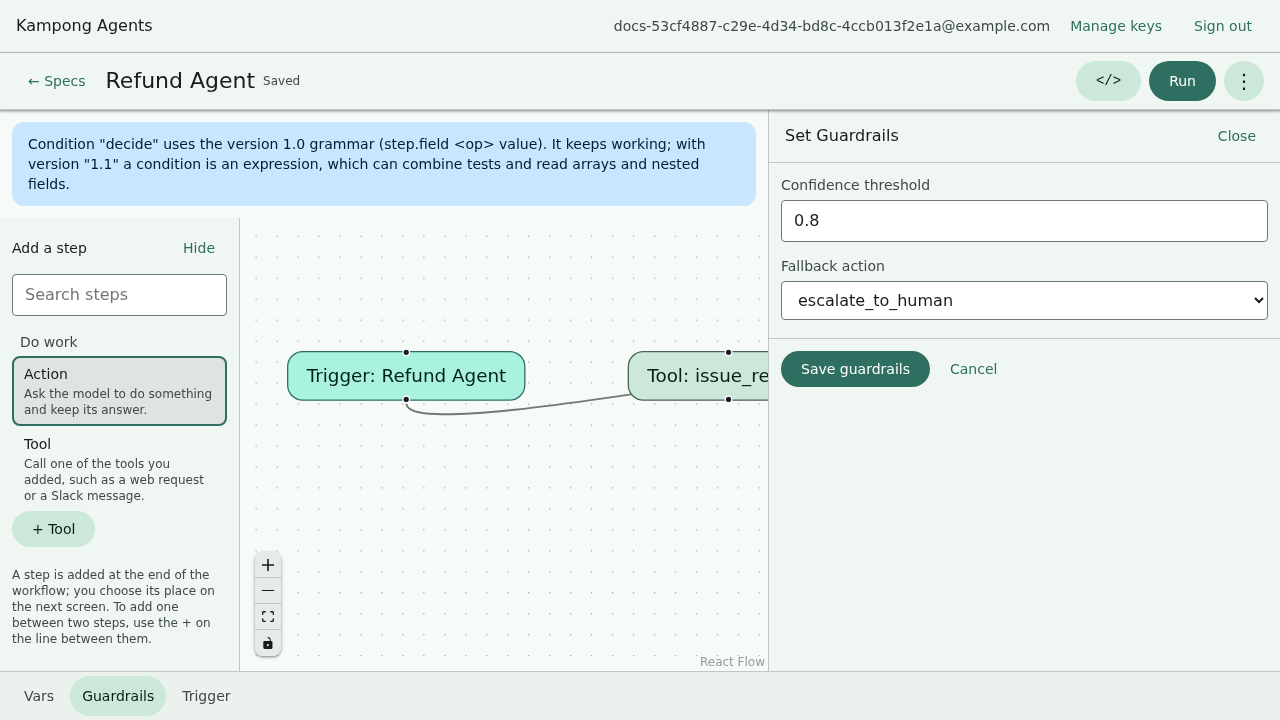
Here's what happens after the decide step runs:
flowchart TD
  run["confidence_gate step runs<br/>→ returns a result + confidence"] --> check{"confidence ≥ 0.7?"}
  check -->|yes| continue([continue the workflow])
  check -->|no| fb{"fallback_action?"}
  fb -->|escalate_to_human| pause["pause for approval"]
  fb -->|anything else| fail([run fails visibly])
  pause -->|approved| continue
pause -->|rejected| rejected([run rejected])| Field | Values | Meaning |
|---|---|---|
confidence_threshold |
a number from 0 to 1 | Below this, the guardrail fires. |
fallback_action |
escalate_to_human |
What to do when it fires. Today the one supported action is to pause for approval. |
A confidence_gate step asks the model for a structured { result, confidence } response. Only
those steps carry a confidence score, so only they can trip the guardrail.
Fail visibly, don't guess
If the guardrail fires but fallback_action isn't escalate_to_human, the run fails with a
clear message instead of quietly continuing. The whole point of a guardrail is to not paper
over the case it exists to catch.
Approving a paused run
However the pause was triggered, the approval experience is the same.
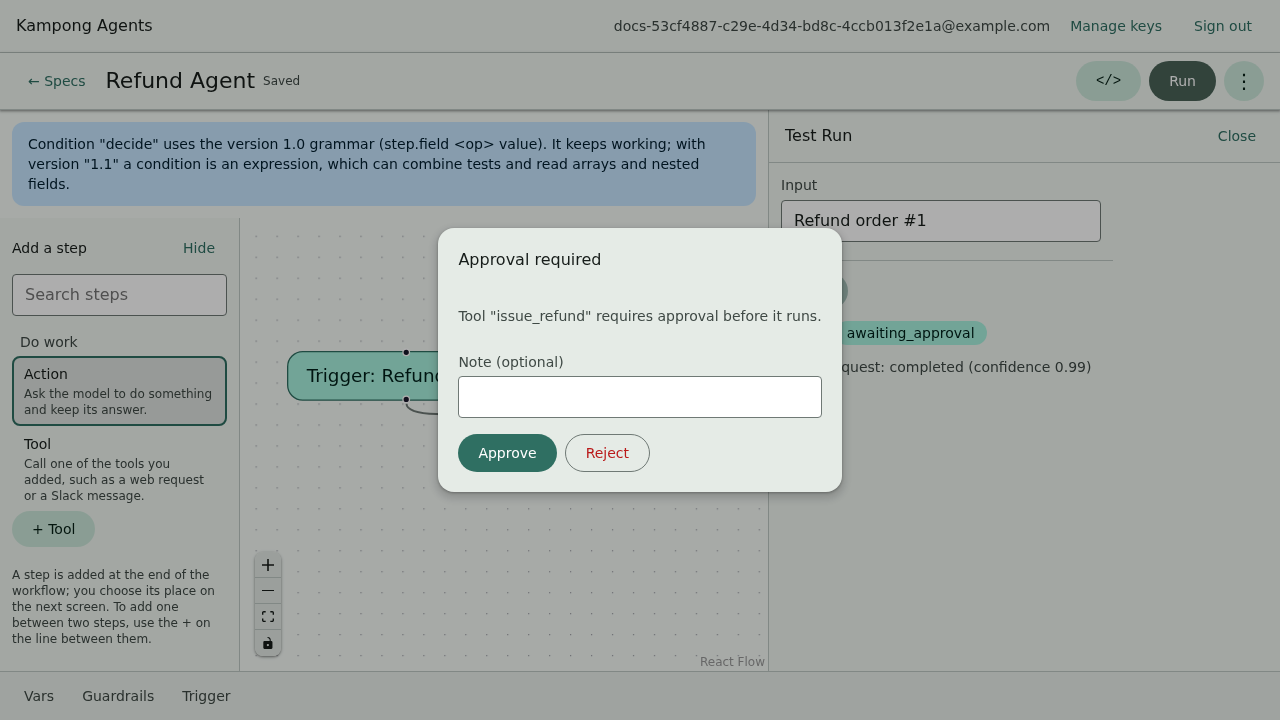
On the canvas. A modal appears naming the step and the reason. Approve to continue, or reject to stop the run.
From kampong run. The run prompts on stdin:
Approval required at step "decide" (guardrail): Confidence 0.4 ... is below the guardrail threshold 0.7.
Approve? [y/N] (reject with a reason via "n:<reason>"):
- Type
yoryesto approve. - Type anything else to reject. Add a reason with
n:<reason>, liken:looks risky, and it's recorded in the run result.
A rejected run ends with a rejected status and exits non-zero: a clear stop, not a silent one.
Running unattended
For CI or a scripted run, you can't sit at a prompt. --approve-all auto-approves every pause:
Each auto-approval is logged to stderr so you can see what was waved through. Use it when you trust the input and want the run to complete without stopping.
Recap
- A run pauses three ways: a tool's
requires_approval, arequest_human_approvalbranch, or a confidence guardrail. - The confidence guardrail needs a
guardrailsblock plus aconfidence_gatestep; it fires when confidence falls belowconfidence_threshold. - The one
fallback_actiontoday isescalate_to_human(pause for approval); anything else fails visibly. - Approve on the canvas modal, at the
kampong runstdin prompt, or with--approve-allfor unattended runs.
Next: run all of this with no network at all, in Running offline.